18 September 2015

Manage Different Cloud Storage with MultCloud

0 comments


For online backup, because i have lots of files, I personally like to use Cloud Storage services that offers Free 15GB+, and I only use Dropbox for small sized file sharing purpose.


MultCloud allows me to transfer files between them, below are the lists of my most favorite Cloud Storage.


Note: for Dropbox, we can get more than 2GB, if we invite more friends who successfully signed up and installed Dropbox.


Free Storage Capacity in GB.

image


In order to use all four different storages, I used the service of "MultCloud-Free App for Transferring Files across Cloud Drives".


With MultCloud, I can transfer big files from Dropbox to Google Drive or OneDrive, after click Run Now I can just close the internet browser, it will run in the background, the transferring processes in handled by MultCloud server.

Example Transfer from Dropbox to OneDrive.

Untitled

Reference: www.multcloud.com
Continue reading →
20 January 2014

PDF Reader Application that Can Create Files to PDF (2 in 1)

0 comments

clip_image002I always forget when installing software to new computer or re-install operating system, PDF Reader is enough for daily works, for the needs of reading PDF files. Until several days, users are coming back to ask for software that can create/convert files to PDF, I need to install another application that’s capable of creating documents to PDF format.

Recently I found one free PDF Reader that has capacity to create/converter files to PDF format. I like this application, because it’s very lightweight and dual capacity (Reader & Creator). It’s free application from Foxit Software, called Foxit Reader.

With Foxit Reader I only install one application that can Read and Create files to PDF. To learn more or download please go to this link http://www.foxitsoftware.com/Secure_PDF_Reader/

Continue reading →
22 October 2013

Waterfox: Fast Browser for 64-bit Systems

0 comments

clip_image002There are lots of browser out there, but I personally only love Firefox. But because Firefox only offer application for 32-bit system, I feel strange loading 32-bit Firefox into 64-bit machine which sometimes crash.

Today I found Waterfox, built based on Firefox source codes dedicate especially for 64-bit systems, now I feel completely use 64-bit applications Smile

If you have 64-bit system, you should give it a try, it also has portable version which you can run it directly from any storage devices. Learn more at Waterfox site.

Continue reading →
12 August 2013

A Thousand Years-Christina Perri

0 comments


I love this song very much, very simple but powerful.


I did a guitar cover of the song, and I also put the video of acoustic version performed by Christina Perri.


"A Thousand Years" is a song by American singer-songwriter Christina Perri and David Hodges. It is taken from the album The Twilight Saga: Breaking Dawn — Part 1: Original Motion Picture Soundtrack.

Source: Wikipedia, the free encyclopedia


If you like to know the story about how she wrote the song, please visit teenvogue.com


Guitar Cover by Jhony Nunes

If you are interested to have this video, you can download here


Christina Perri performs her song "A Thousand Years" in an exclusive recording session live at The Fortress in Los Angeles, CA for The Live Room on The Warner Sound.


Continue reading →
04 August 2013

How to Create Free Online Registration Form with Google Docs (Google Drive)

0 comments


imagesGoogle Docs is a freeware web-based office suite offered by Google within its Google Drive service. It also was a storage service but has since been replaced by Google Drive. Wikipedia

I know many organization who host a seminar/workshops provide Registration Form for their participants to download and submit through email after completing the registration form. There are many online tools out there that provide free with limited number of forms, and so on.

This time I want to introduce Google Docs which is free and no hidden cost. It will combine Google Doc-Form and Google Doc-Spreadsheet. The Google Form will take care of the form interface for users and Google Spreadsheet will take care the results/entries when users submit their forms in Excel Format.

Interesting hah?

Requirement: Gmail Account & Internet Connection

1. Open Google Docs at https://drive.google.com/‎ and sign in with Google account

clip_image002

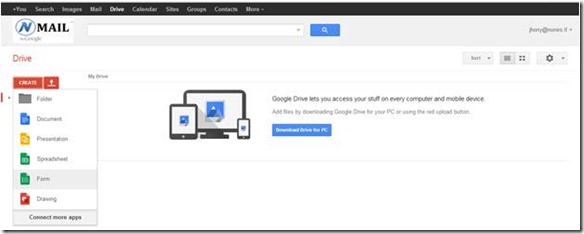
2. After signed in, we are going to create New Form for our Online Registration purpose. Click Create >> Form
clip_image004

3. A new windows will open, showing you how the form will works. Create, Share, Send and Analyze. Click on Get Started.

clip_image006

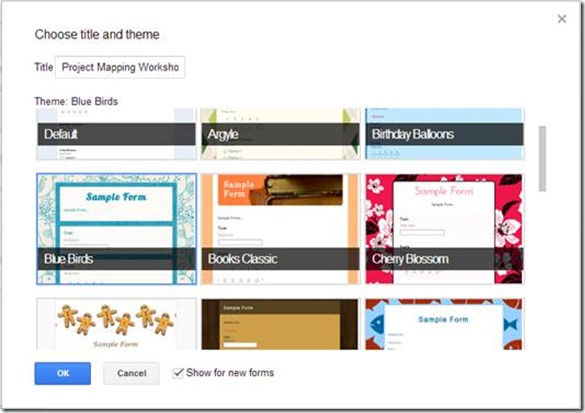
4. Choose Title and Theme for your Registration Form. Name your form and choose any theme and click OK.
clip_image008

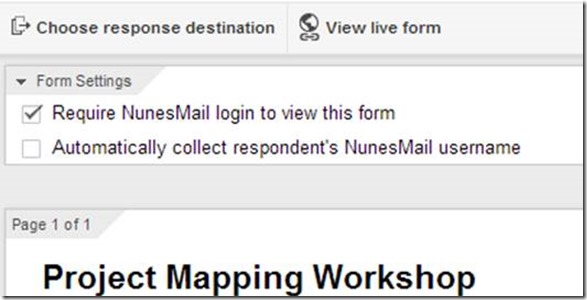
5. On top of the form, Un-tick the mark in the Require Gmail login to view this form
clip_image010

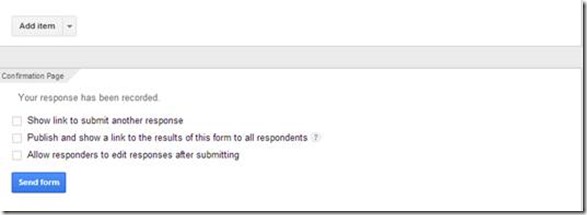
6. After type your questions into form, click Send (it will publish the form)
clip_image012

7. It will show options to share via Facebook, Gmail, Twitter or Send Form via email…if you want to put the link to your website, click embed…as I want to just share the link to the form in my website, I will send the link of the form to my email. Type email address and Send

clip_image014

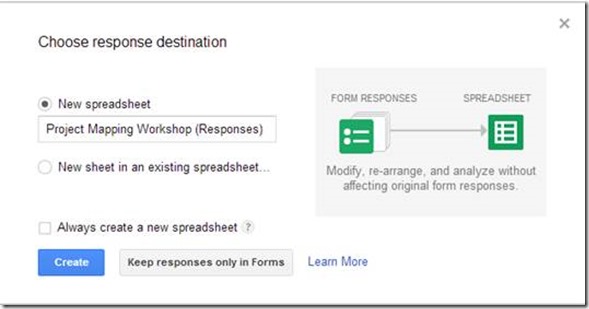
8. It will ask the destination of the Form Result, so I will automatically record an entry when users submit the form. Just click create, it will create New spreadsheet YourFormTitle (Responses)
clip_image016

9. Congratulation. Your form is ready for use.

To test this form, please click here. Complete the Form and click Submit

clip_image018

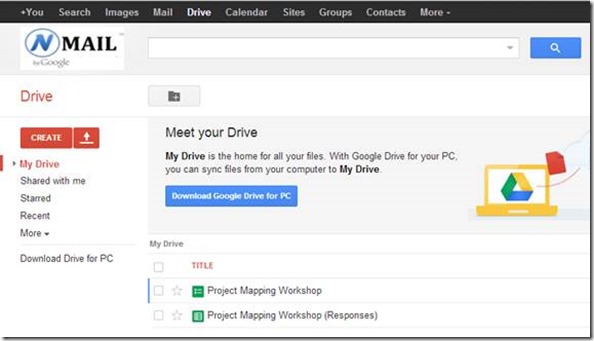
Back to My Drive, there are 2 new files, to view the responses, click the spreadsheet.
clip_image020

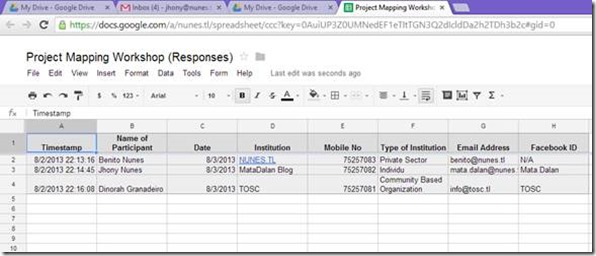
This is the sample of Excel Spreadsheet, results of my form submission.
clip_image022

Hit Like and Share, if you find this useful.

Special Notes:

I was looking after my son Benito when writing this guide, it was too late when I hear his crying voice, he had already fallen down from bed. This guide, specially dedicated to my son, Benito Granadeiro Nunes (9 months old when I wrote this guide, 3 August 2013.) I was so sorry for him because could not be a good father for the first time,after being a father for 9 months.

Continue reading →
20 March 2013

Recover Unallocated Hard Disk

0 comments

imageA friend of mine bring me an external hard disk that suddenly become undetected and after further investigation, I found it’s unallocated.

Because too many important files, I need to recover the partition as it is, without losing any data.

After browsing many sites, I found the freeware partition software that could recover the lost/damage partition. it’s called MiniTool Partition Recovery. If you experience the same problem, you can use this software and the complete HowTo guide from this link http://www.minitool-partitionrecovery.com/recoverymore.html.

Continue reading →
12 March 2013

Not All Mobile Devices Can Use 3G Data Internet Package of Telkomcel.TL

0 comments
Regular mobile and modem, will not have access to 3G Service of Telkomcel, regular mobile devices will only get 2G which is very slow. I have confirmed with Telkomcel before writing this article, they said Telkomcel got the license to operate in 850 MHz. To get more info about UMTS band frequency, please click here.

I just provide simple example for your guidance if you plan to buy a mobile phone to be used in Timor Leste, especially for Telkomcel.


Mobile/Tablet Not Supported 3G of Telkomcel, without 850 in 3G Network HSDPA Mobile/Tablet that Suporta 3G of Telkomcel, with 850 in 3G Network
Samsung P1000 Galaxy Tab

2G Network: GSM 850 / 900 / 1800 / 1900

3G Network: HSDPA 900 / 1900 / 2100


Galaxy Note II N7100

2G Network GSM 850 / 900 / 1800 / 1900

3G Network HSDPA 850 / 900 / 1900 / 2100

HSDPA 850 / 900 / 2100 - N7105


Galaxy Y S5360

2G Network GSM 850 / 900 / 1800 / 1900

3G Network HSDPA 900 / 2100


Samsung I9300 Galaxy S III

2G Network GSM 850 / 900 / 1800 / 1900

3G Network HSDPA 850 / 900 / 1900 / 2100


Samsung Galaxy Mini S5570

2G Network GSM 850 / 900 / 1800 / 1900

3G Network HSDPA 900 / 2100


Samsung I9070 Galaxy S Advance

2G Network GSM 850 / 900 / 1800 / 1900

3G Network HSDPA 850 / 900 / 1900 / 2100


The same rule apply to USB Modem or Pocket Wifi, if you plan to buy a modem, ask the specification that support 3G 850 band, so at anytime you can feel the 7,2 Mbps 3G of Telkomcel.

To check your mobile’s specification, visit GSM Arena and Search your mobile brand and model.


Telkomcel Data Internet Package

Daily: $2, Quota: 50 MB. To activate, Send SMS to 155 type “On 50M

Weekly: $15, Quota: 400 MB. To activate, Send SMS to 155 type “On 400M

Monthly:

$18, Quota: 1 GB. To activate, Send SMS to 155 type “On 1G

$30, Quota: 2 GB. To activate, Send SMS to 155 type “On 2G

$50, Quota: 3 GB. To activate, Send SMS to 155 type “On 3G

$80, Quota: 5 GB. To activate, Send SMS to 155 type “On 5G

For more information, visit http://www.telkomcel.tl/static-17-internet.html


Continue reading →

You might also like: